

The ticket that starts before the complaint
Most support tickets do not begin in the inbox. They begin earlier, inside the order flow: when a payment fails, a shipment stalls, a tracking scan disappears, or a delivery promise becomes impossible to keep.
For years, customer support has been treated as the place where problems arrive after the customer notices them. In e-commerce and logistics, that model is becoming harder to defend. A shopper asking “Where is my order?” is rarely the first sign of trouble. The business often had the signal already, but it was trapped in a commerce platform, carrier feed, payment gateway, warehouse system, marketplace dashboard, or spreadsheet.
That gap is where support automation from real order events becomes valuable.
The goal is not to replace support teams with automated replies. The stronger idea is more operational: create the right support ticket when the order itself shows that something needs attention. A failed payment can create a billing review. A stalled shipment can create a logistics exception. A missed fulfillment milestone can trigger an internal escalation. A cancellation request after warehouse processing has started can route to a human before the customer receives the wrong promise.
This changes the role of support. Instead of being the department that discovers a broken order after the damage is done, support becomes one of the first systems to know.

Why order support is now an operations problem
The post-purchase experience has become one of the most visible parts of the customer relationship. A smooth website or attractive checkout matters less if the customer spends the next three days wondering whether the order is moving.
Salesforce has described WISMO inquiries, short for “Where is my order?”, as a major source of avoidable support volume. These requests often force agents to perform manual lookups across systems, even though the company already holds the relevant information somewhere in its stack.
McKinsey’s delivery research points in the same direction. Consumers increasingly care about reliability and cost, not only speed. Many actively track their orders, and they become more forgiving when companies proactively communicate delays and offer clear options. The lesson is simple: silence often creates the support problem before the delay itself does.
Inside the business, the pressure lands on support agents, warehouse teams, logistics managers, and operations leads. Agents answer questions they should not need to research manually. Warehouse teams chase order statuses that should already be visible. Logistics managers handle escalations after the customer has already lost trust.
The problem is rarely a total lack of data. The problem is that the data does not move into the right workflow at the right time.

What real order events can do
Most modern commerce and logistics stacks already produce the signals needed for better support workflows. Shopify supports webhook events for order creation, payment, fulfillment, cancellation, risk assessment, and order updates. Stripe recommends webhooks for asynchronous payment events such as successful or failed payments. Amazon’s Selling Partner API allows merchants to receive notifications when order or inventory changes occur.
Support systems can receive these signals as well. Zendesk, Salesforce Service Cloud, Gorgias, Freshdesk, and other platforms can create or update tickets through APIs, triggers, rules, and custom fields. The technical capability exists. The harder question is how to design the workflow so it creates control rather than noise.
A raw order event is not always useful on its own. A good automation layer enriches the event before it becomes a ticket. It connects the event to the order ID, customer record, promised delivery date, fulfillment status, carrier scan, payment state, marketplace SLA, and previous support history.
That enrichment is what separates useful automation from basic alerting.
A ticket that says “shipment delayed” is weak. A ticket that says “Order #48219 has had no carrier scan for 48 hours, delivery promise is at risk tomorrow, customer is a VIP account, and no previous notification has been sent” gives the support or logistics team something they can act on.
The order ID should become the anchor. Customer emails, tracking numbers, and marketplace references can change or be incomplete. The order ID is usually the most stable way to connect commerce, fulfillment, support, and customer communication.
The events that deserve attention
Not every order event should create a support ticket. If every update becomes a case, automation will only move the mess from one system to another. The value comes from identifying events that signal business risk, customer confusion, or a need for human review.
The strongest candidates usually include failed payments, delayed fulfillment, stalled tracking, failed delivery attempts, address validation issues, partial shipments, cancellation requests after fulfillment starts, refund requests that need approval, marketplace SLA risks, carrier exceptions, high-value order delays, and repeated customer contact about the same order.
These events matter because they connect operational reality to customer experience. They are not abstract system logs. They are moments when the business still has a chance to intervene.
For a 3PL, this might mean routing a stalled shipment to the right account team before the retailer escalates. For a warehouse manager, it might mean seeing fulfillment exceptions without waiting for a customer complaint. For a marketplace seller, it might mean protecting performance metrics before an SLA breach affects account health.
This is where automation becomes practical. It does not ask teams to monitor every order manually. It lets them focus on the orders that are drifting away from the expected path.

The architecture behind cleaner support
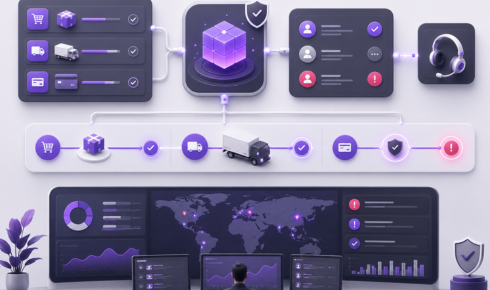
The most durable approach is event-driven. Instead of relying on manual checks, systems communicate through events. A commerce platform emits an order update. A payment provider sends a payment result. A carrier feed shares a delivery status. An integration layer receives these signals, enriches them, applies rules, and sends the right action to the right system.
That action may be a support ticket, an internal note, a Slack alert, a customer notification, a dashboard update, or a warehouse task.
This matters because order operations are distributed by nature. One customer order may touch a storefront, payment gateway, ERP, WMS, TMS, carrier API, CRM, support desk, and marketplace platform.
When these systems do not share events cleanly, teams work from different versions of the truth. Support sees the complaint. The warehouse sees the pick status. The carrier sees the last scan. Finance sees the payment issue. The customer sees silence.
Order event automation connects those fragments into one operational workflow.
It also needs careful design. Webhooks can arrive more than once. Events can fail and retry. Data formats can change. Carrier updates can be delayed. If the automation layer does not handle duplicates, retries, queues, and reconciliation, it can create duplicate tickets or trigger the wrong action.
For business leaders, the point is control. Poor automation creates more noise. Strong automation creates cleaner visibility.

Where automation should stop
There is a line between useful automation and reckless automation.
Creating a ticket from a real order event is usually low risk when the ticket is routed for review. Automatically issuing refunds, canceling orders, overriding fraud checks, or promising compensation is a different matter. Those actions can affect revenue, customer trust, compliance, and marketplace standing.
The safer model is to let software detect, assemble, and route. Humans should still decide when judgment is required.
This is especially important in edge cases. A failed payment may be a simple card issue, but it may also involve fraud review. A cancellation request may be easy before fulfillment, but complicated after the item has been picked. A delivery exception may need a replacement, a carrier claim, or only a proactive message.
Automation is strongest when it removes repetitive searching and weak handoffs. It is weaker when it tries to make every business decision by itself.
Who owns the ticket? What status should trigger action? Which team receives the alert? When should the customer be notified? What happens if the carrier later updates the scan? What should be logged back into the CRM or ERP?
Without those answers, automation becomes decoration. With them, it becomes part of the company’s operating system.
The business value is not just faster support
It is tempting to frame this kind of automation as a support efficiency project. That is only part of the story.
The bigger value is that support becomes connected to the real operating state of the business. Order data, delivery data, payment events, and customer communication begin to move through the same workflow.
That matters for logistics managers because exceptions become visible earlier. It matters for e-commerce operations because support volume becomes tied to actual order risk, not only customer complaints. It matters for IT leaders because integrations stop being isolated connectors and start becoming part of a governed process.
A delayed order is not only a support issue. It may reflect a warehouse backlog, carrier failure, inventory mismatch, payment delay, marketplace constraint, or integration gap. When support tickets are created from real order events, they can help the business see those patterns faster.
The result is not only faster response time. It is a cleaner operating model.
The new frontline of customer trust
For years, support automation was often framed as deflection: keep the customer away from the agent. That idea is too narrow for modern e-commerce and logistics.
The more mature model is to create fewer, better, earlier tickets. Open the case when the order shows risk, not only when the customer complains. Give the agent the order context before the first reply. Give logistics teams a clear exception before the escalation call. Give operations leaders a way to see where order flow is breaking repeatedly.
The future of support is not just a better inbox. It is a support function connected to real business events.
In that model, software detects and assembles. Humans decide and reassure. The customer does not need to explain what the company should already know. And the business does not wait for a complaint to discover that an order has gone off course.
That is the real promise of support automation from order events: not more tickets, but better-timed ones. Not more alerts, but clearer ownership. Not faster noise, but earlier control.