- 3PL and Logistics
- API Integration
- Mobile app
Mobile Route Planning App for Delivery Teams
A lightweight mobile app built to help delivery teams create, view, save, and reuse delivery routes. The app supports multi-stop address input, public map-based route generation, route summaries, and local route history, keeping route planning simple for day-to-day delivery use.

Overview
Quick overview: key aspects of our work - discover the essentials of our project
Industry
Country
Solution type
Services
About the client
Understanding our client: specifics, challenges, and custom solutions
RouteMagic was developed as an internal WebMagic demonstration product for the logistics and delivery domain. The project was created to showcase WebMagic’s mobile development capability through a simple route planning app that could be useful for small delivery teams, couriers, and logistics-focused service providers.
Problem
Solution
Key features
Project features overview: essential enhancements and strategic solutions
-
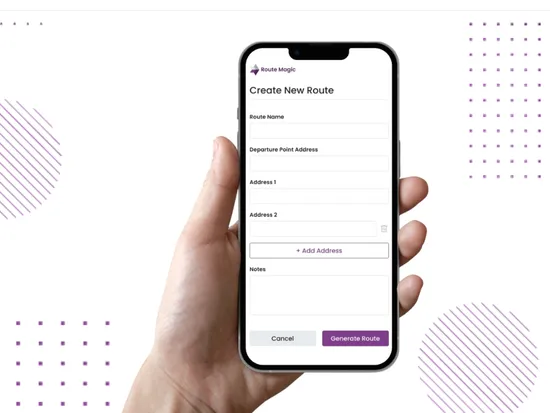
Multi-Stop Route Planning
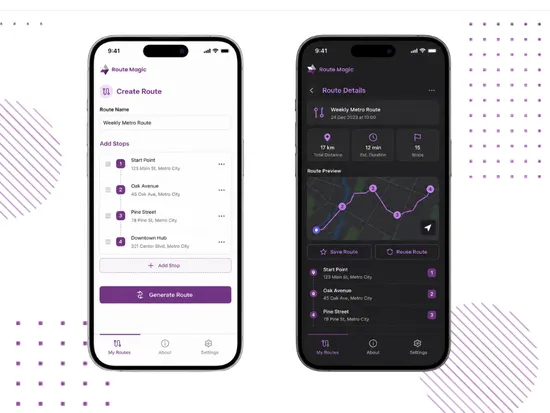
Users can create a delivery route by adding a departure point and multiple destination addresses. The address flow supports manual entry and autocomplete through public mapping services, helping users build multi-stop delivery routes from a simple mobile interface.Before generating the route, users can edit addresses, remove stops where allowed, and manually reorder delivery points.This keeps route planning flexible while avoiding complex dispatching, driver assignment, or fleet-management logic. -
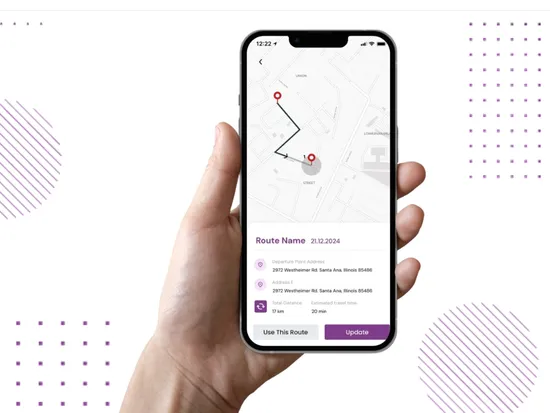
Map-Based Route Generation
The app uses public map services to calculate and display a route based on the selected stops. The generated route is shown on an interactive map with ordered pins, making the delivery sequence easy to review visually.Each route view includes the essential planning details for quick decision-making: ordered address list, total distance, estimated travel time, and optional route notes. -
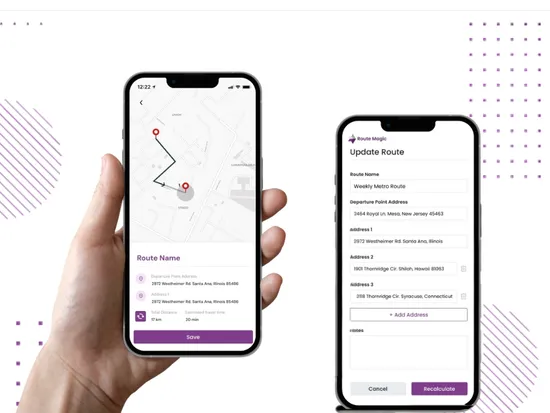
Local Route Storage Without User Accounts
Routes are saved locally on the user’s device, so users can keep delivery plans without account creation, cloud sync, or backend-heavy route management. This matches the controlled MVP scope defined for the app.Local storage supports the app’s lightweight product logic: users can save a route, return to it later, and manage route plans directly from the mobile app. -
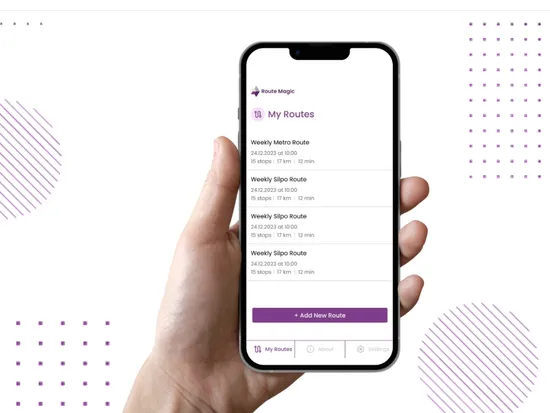
Route History and Reuse Flow
The My Routes screen gives users access to previously saved delivery plans. Each route card includes key route information such as route name, creation date, number of stops, distance, and estimated travel time.Users can reopen saved routes, update addresses, recalculate the route, duplicate an existing route as a new delivery plan, or delete routes that are no longer needed. -
Cross-Platform Mobile App Structure
The app was developed for Android and iOS mobile publishing workflows, with a branded splash screen, simple bottom navigation, route-focused screens, and light/dark mode support.The mobile structure keeps the product focused on a small set of route planning actions: create, generate, review, save, reuse, update, and delete routes.


Result
Performance Showcase: Unveiling the Results of Our Collaborative Endeavors
Do you have a business challenge you’d like to resolve?
If you have an idea or a problem that you would like to eliminate in your business processes, leave a request. We will be happy to discuss this with you at a free consultation and find the most suitable solution for your specific situation
Discover how WebMagic transforms ideas into intelligent digital solutions. Our case studies highlight real projects in AI-powered automation, logistics platforms, SaaS tools, e-commerce systems, and custom web development.
From streamlining supply chains to building smart dashboards and integrating wearable data with AI — each case shows how we solve complex problems with scalable, tech-driven systems.
We work with clients across industries to deliver high-impact results: faster processes, clearer insights, and stronger digital infrastructure.
Explore how we’ve helped startups, enterprises, and growing teams turn challenges into success — and imagine what we can build for your business.